
Testing emails with Cypress is easy once you know the trick: generate a unique email address for each test, do the action in your app that should send an email, use cy.task() to request the email from an email testing service’s API, and assert on the email’s subject, link or code. This guide uses testmail.app, where each {namespace}.{tag}@inbox.testmail.app is a separate inbox, with no setup or cleanup required. A live query waits on the server until the email arrives, with no cy.wait() or polling required.
You’ll end up with two Cypress tasks, four custom Cypress commands, tests for transactional emails (signup codes, verification links and password resets), tests for the email itself (links, images, spam score, mobile-friendliness and one-click unsubscribe), and a GitHub Actions workflow. You can paste the setup into an existing project. The code in this guide works with Cypress 16 (which removed Cypress.env()). The API key for testmail.app only ever needs to be available in the Node process, so it never reaches the browser, screenshots or the Command Log.
Updated November 2026: Cypress 16 compatibility, a unique email address per test, waiting for emails on the server, and new sections on password resets, links that point to other origins, and CI.
Four ways to test email in Cypress
Cypress can't read an inbox on its own, so every approach adds something that receives the email and hands it back to the test. They differ in how much of the real path they cover:
| Approach | How it works | What it proves | Watch out for |
|---|---|---|---|
| Email testing API (testmail.app, Mailosaur, MailSlurp, Mailtrap) | Your app sends real email through its usual provider; a task or command fetches it by API | Delivery, content, links and codes, end to end, on a laptop, in CI or against staging | Needs an account and an API key, and your provider must be allowed to send to the test domain |
Local SMTP server (smtp-tester in setupNodeEvents, or Mailpit in Docker) | Point the app's SMTP settings at a server the test controls | Content, links and codes, with no network and no cost | Only works where you control the app's SMTP settings, and skips your real provider, DNS and signing |
| Real mailbox (Gmail API via gmail-tester) | Read a real Gmail inbox over OAuth | The email reaches a consumer inbox | OAuth setup, one shared inbox, and polling: gmail-tester checks every 30 seconds by default |
Stub the request (cy.intercept()) | Intercept the call your front end makes before the server sends the email | That the app asked for an email | Nothing is sent or read, so a broken template or link still passes |
Which to pick: if you want to test email in development on your laptop, a local SMTP server is a good idea (Cypress themselves did this in their 2021 post on testing HTML emails with smtp-tester). But if you want reliable tests you can use to gate deploys (testing user journeys like signing up, one-time codes, password resets and magic links) or run against staging, use an email testing service with an API, because it checks the email your users would actually get. This guide uses testmail.app’s API because it’s easy to wait for emails with it, but the same ideas apply to any email testing service whose API can wait for email. If you’re interested in testing with a local SMTP server, see test SMTP servers compared.
How a Cypress email test works
A Cypress test runs in the browser, while setupNodeEvents in your config runs in Node. Cypress tasks let you escape the browser and run code in that Node process, with cy.task() passing values between the two. You use them to talk to testmail.app’s API to check the emails your app sent. The email check belongs on the Node side:

How a Cypress email test works · 5 parts, 5 steps
An email address in the format {namespace}.{tag}@inbox.testmail.app exists as soon as you send something to it. You can pick anything for tag, even something that contains dots (cy.signup.4f9a1c). The namespace is specific to your testmail.app account. Each test uses a different email address, so you can’t get emails from other tests. That’s what makes it possible to run tests in parallel and to retry tests.
Why the API call runs in Node. The task reads TESTMAIL_APIKEY from the Node process, so it never enters the browser and isn’t visible in videos, screenshots or the Command Log. These tasks will work with any version of Cypress that supports setupNodeEvents (Cypress 10 or later) and aren’t affected by the removal of Cypress.env() in Cypress 16. These tasks require Node 18 or later. You can use cy.request() instead of tasks to make API requests from custom commands, as covered further down.
Set up Cypress and testmail.app
Install Cypress in the application you want to test. Cypress 16 requires Node.js 22, 24, or 26 or later.
npm install --save-dev cypressIn your testmail.app account console, copy your API key and namespace, then export them as environment variables in the shell you run Cypress from. The following tasks read environment variables in Node, so you don’t need to commit your API key to your code repository or add it to cypress.env.json.
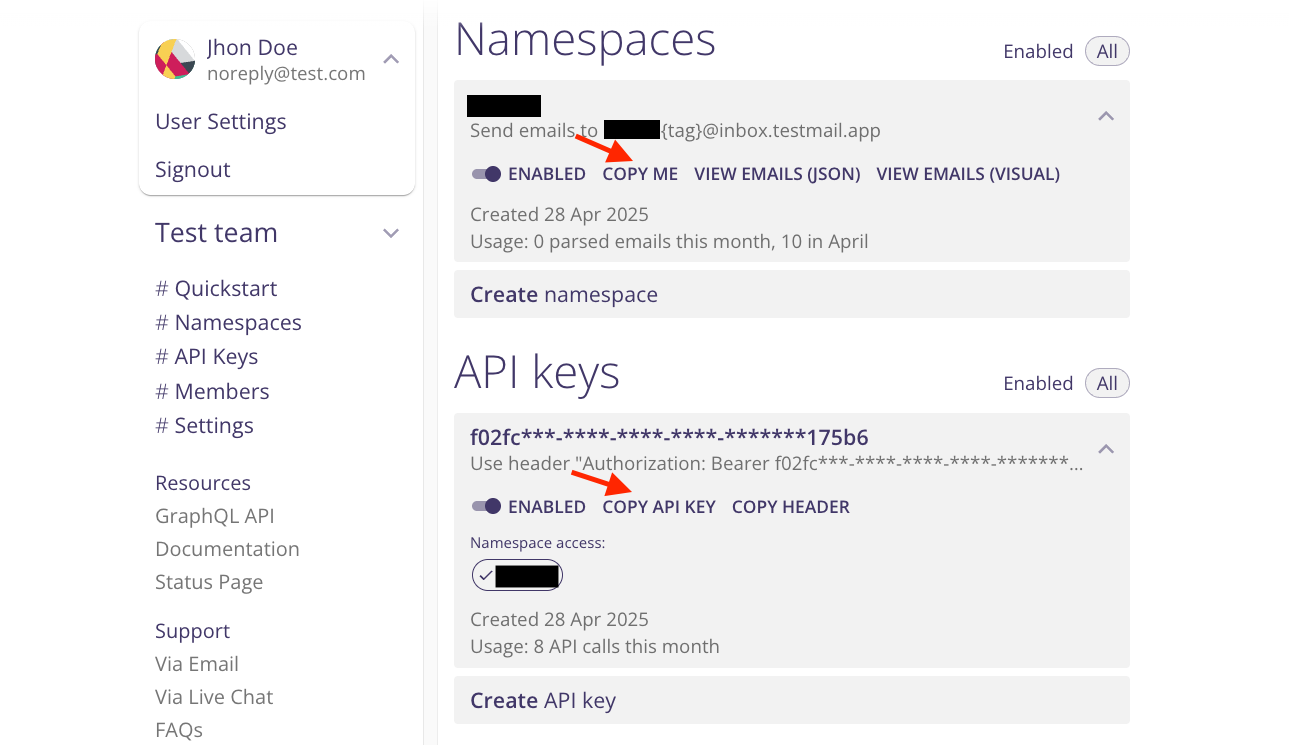
export TESTMAIL_APIKEY=your-api-key
export TESTMAIL_NAMESPACE=your-namespace
Add these two tasks to cypress.config.js. This is the only file where we use the testmail.app API:
// cypress.config.js
const { defineConfig } = require('cypress');

const API = 'https://api.testmail.app/api/json';
const { TESTMAIL_APIKEY, TESTMAIL_NAMESPACE } = process.env;

module.exports = defineConfig({
  e2e: {
    baseUrl: process.env.BASE_URL || 'http://localhost:3000',
    setupNodeEvents(on) {
      on('task', {
        // A new address for every test: nothing to create, nothing to clean up
        newInbox(prefix = 'cy') {
          if (!TESTMAIL_APIKEY || !TESTMAIL_NAMESPACE) {
            throw new Error('Set TESTMAIL_APIKEY and TESTMAIL_NAMESPACE before running Cypress');
          }
          const tag = `${prefix}.${Date.now()}.${Math.random().toString(36).slice(2, 8)}`;
          return { tag, address: `${TESTMAIL_NAMESPACE}.${tag}@inbox.testmail.app`, since: Date.now() };
        },

        // The API holds this request open until an email for the tag arrives after `since`
        async waitForEmail({ tag, since, spamReport = false, headers = false }) {
          const params = new URLSearchParams({
            apikey: TESTMAIL_APIKEY,
            namespace: TESTMAIL_NAMESPACE,
            tag,
            timestamp_from: String(since),
            livequery: 'true', // all lowercase
          });
          if (spamReport) params.set('spam_report', 'true');
          if (headers) params.set('headers', 'true');

          const res = await fetch(`${API}?${params}`, { signal: AbortSignal.timeout(85_000) });
          const body = await res.json();
          if (body.result !== 'success') throw new Error(`testmail.app: ${body.message}`);
          if (!body.emails.length) throw new Error(`No email for ${tag}`);
          // The oldest email we haven't seen yet
          return body.emails.reduce((a, b) => (a.timestamp <= b.timestamp ? a : b));
        },
      });
    },
  },
});
What each part does:
newInboxgenerates a tag using a random suffix and timestamp so that even if two tests start at the same millisecond, they won’t generate the same address. It also stores the time the test started insince, but doesn’t make an API request.livequery=truetells the API to wait until at least one email matches before responding to the request. testmail.app re-issues requests that are waiting with HTTP status code 307 every 60 seconds, andfetchin Node follows redirects automatically. This means we don’t need to repeatedly make requests to check for email.timestamp_fromprevents the API from returning emails we already processed. This is important because if there are emails that match a live query, the API responds immediately. If we didn’t usetimestamp_from, the API would return the same email over and over. For example, if the first email was a signup verification email and the second was a password reset email.AbortSignal.timeout(85_000)adds a timeout so that if an email never arrives, we fail the test with an error. We need to set this lower than 90 seconds, which is the timeout we’ll use when we callcy.task(). By default Cypress doesn’t wait more than 60 seconds for a task to complete.- We use
reduceto get the earliest email if more than one email arrives at the same time. This helps us to process emails in the same order the application under test sent them.
Add four custom commands
Import your custom commands from cypress/support/e2e.js, which Cypress runs before each spec file:
// cypress/support/e2e.js
import './commands';
// cypress/support/commands.js
Cypress.Commands.add('newInbox', (prefix = 'cy') => cy.task('newInbox', prefix));
Cypress.Commands.add('waitForEmail', (inbox, { spamReport = false, headers = false } = {}) =>
cy
.task('waitForEmail', { tag: inbox.tag, since: inbox.since, spamReport, headers }, { timeout: 90_000 })
.then((email) => {
inbox.since = email.timestamp + 1; // the next wait skips this email
return email;
})
);
Cypress.Commands.add('linkFrom', (email, path) => {
const doc = new DOMParser().parseFromString(email.html, 'text/html');
const href = [...doc.querySelectorAll('a[href]')]
.map((a) => a.getAttribute('href')) // the DOM decodes & for you
.find((url) => path.test(url));
expect(href, `link matching ${path}`).to.be.a('string');
return cy.wrap(href, { log: false });
});
Cypress.Commands.add('codeFrom', (email, pattern = /\b\d{6}\b/) => {
const code = email.text.match(pattern)?.[0];
expect(code, `code matching ${pattern}`).to.be.a('string');
return cy.wrap(code, { log: false });
});cy.newInbox()returns{ tag, address, since }. You can callcy.newInbox()inside a test or in abeforeEachhook. Do not call it at the top level of the spec file, so it will be re-run when retrying a failed test.cy.waitForEmail(inbox)returns the next email in the inbox. It updatesinbox.sinceso subsequent calls tocy.waitForEmail(inbox)will return the next email after that. You can ask for the spam score withcy.waitForEmail(inbox, { spamReport: true })and for the raw headers withcy.waitForEmail(inbox, { headers: true }).- Use
cy.linkFrom(email, /pattern/)to gethrefattributes from emails, since it uses the browser’s own HTML parser (instead of a regular expression) and will decode&into & like an email client. A regular expression over the raw HTML leaves&in the URL and breaks signed links. - You can use
cy.codeFrom(email)to extract the first six-digit number in the plain-text part of an email. You can pass in your own regular expression if you use a different code format, e.g./\b[A-Z0-9]{8}\b/.
If you use TypeScript, declare your custom commands so your editor can pick up return types:
// cypress/support/index.d.ts
type Inbox = { tag: string; address: string; since: number };
type Email = {
  from: string;
  subject: string;
  html: string;
  text: string;
  timestamp: number;
  spam_score?: number; // with { spamReport: true }
  spam_report?: string;
  headers?: { key: string; line: string }[]; // with { headers: true }
};

declare namespace Cypress {
  interface Chainable {
    newInbox(prefix?: string): Chainable<Inbox>;
    waitForEmail(inbox: Inbox, options?: { spamReport?: boolean; headers?: boolean }): Chainable<Email>;
    linkFrom(email: Email, path: RegExp): Chainable<string>;
    codeFrom(email: Email, pattern?: RegExp): Chainable<string>;
  }
}
Test signup verification
The following test spec can be saved as cypress/e2e/signup.cy.js. It uses two helpers to make the tests more readable. Replace the selectors and button labels with those in your app.
// cypress/e2e/signup.cy.js
const PASSWORD = 'correct horse battery staple';

function startSignup(address) {
  cy.visit('/signup');
  cy.get('input[name=email]').type(address);
  cy.get('input[name=password]').type(PASSWORD, { log: false });
  cy.contains('button', 'Create account').click();
}

function signUp(inbox) {
  startSignup(inbox.address);
  cy.waitForEmail(inbox).then((email) => cy.codeFrom(email)).then((code) => {
    cy.get('input[name=code]').type(code);
  });
  cy.contains('button', 'Verify').click();
  cy.contains('h1', 'Welcome').should('be.visible');
}
Verification code (OTP)
it('a verification code activates a new account', () => {
  cy.newInbox().then((inbox) => {
    startSignup(inbox.address);

    cy.waitForEmail(inbox).then((email) => {
      expect(email.from).to.contain('no-reply@yourapp.com');
      expect(email.subject).to.match(/verify/i);
      cy.codeFrom(email).then((code) => cy.get('input[name=code]').type(code));
    });
    cy.contains('button', 'Verify').click();
    cy.contains('h1', 'Welcome').should('be.visible');
  });
});
We also check the sender and subject here to ensure that your app isn’t using a wrong configuration or email template. For example, if you forgot to change the sender from a staging environment. This would still send an OTP code, and without checking the sender and subject such a bug would not be detected. For OTP emails that expire after some time, resend limits and account lockouts, see the email OTP testing guide.
Verification link
it('a verification link activates a new account', () => {
  cy.newInbox().then((inbox) => {
    startSignup(inbox.address);
    cy.waitForEmail(inbox)
      .then((email) => cy.linkFrom(email, /\/verify/))
      .then((link) => cy.visit(link));
    cy.contains('h1', 'Welcome').should('be.visible');
  });
});
Note that we’re using cy.visit(link) in the same test, which means we use the same cookies as when signing up. Some apps only allow such links to open in the same browser, as some magic link and PKCE flows do.
When the link opens on another origin
If your app is served from app.yourapp.com but the link opens on auth.yourapp.com, Cypress will consider this another origin. In such cases, use cy.origin() to run Cypress commands on that origin and pass the path in with args:
it('a verification link on the auth subdomain confirms the email', () => {
  cy.newInbox().then((inbox) => {
    startSignup(inbox.address);
    cy.waitForEmail(inbox)
      .then((email) => cy.linkFrom(email, /\/verify/))
      .then((link) => {
        const { origin, pathname, search } = new URL(link);
        cy.origin(origin, { args: { path: pathname + search } }, ({ path }) => {
          cy.visit(path);
          cy.contains('Email confirmed').should('be.visible');
        });
      });
  });
});
Magic links work similarly; see the magic link testing guide for how to test if the link only works once, expires and opens in a second browser.
Test the password reset email
A reset test needs an account first, so it calls signUp(), which reads the verification email. Note that since we already received the account verification email, our inbox now contains two emails. The reason that cy.waitForEmail() returns the password reset email (and not the account verification email again) is because inbox.since was updated when receiving the account verification email.
it('a password reset email sets a new password', () => {
  cy.newInbox().then((inbox) => {
    signUp(inbox);

    cy.visit('/forgot-password');
    cy.get('input[name=email]').type(inbox.address);
    cy.contains('button', 'Send reset link').click();

    cy.waitForEmail(inbox) // skips the verification email
      .then((email) => {
        expect(email.subject).to.match(/reset/i);
        return cy.linkFrom(email, /\/reset-password/);
      })
      .then((link) => cy.visit(link));
    cy.get('input[name=password]').type('a brand new passphrase', { log: false });
    cy.contains('button', 'Save password').click();

    cy.visit('/login');
    cy.get('input[name=email]').type(inbox.address);
    cy.get('input[name=password]').type('a brand new passphrase', { log: false });
    cy.contains('button', 'Log in').click();
    cy.contains('h1', 'Welcome').should('be.visible');
  });
});
It’s important to check that you can log in using the new password. Otherwise your app might show a “Password updated” message but logging in using the old password might still work.
We also check that the password reset link does not work after we’ve used it. To do so, we open the link twice:
it('the reset link works only once', () => {
  cy.newInbox().then((inbox) => {
    signUp(inbox);
    cy.visit('/forgot-password');
    cy.get('input[name=email]').type(inbox.address);
    cy.contains('button', 'Send reset link').click();

    cy.waitForEmail(inbox)
      .then((email) => cy.linkFrom(email, /\/reset-password/))
      .then((link) => {
        cy.visit(link);
        cy.get('input[name=password]').type('a brand new passphrase', { log: false });
        cy.contains('button', 'Save password').click();

        cy.visit(link); // the same link, a second time
        cy.contains(/expired|invalid|already used/i).should('be.visible');
      });
  });
});
Instead of using cy.wait() for a long amount of time, configure your app to use shorter link expiries in tests, e.g. 1 minute.
Check the email itself
The sign-up flow may work fine while the email is still broken in some way: a hyperlink (perhaps in the email footer) is dead, the logo doesn’t appear, the email gets marked as spam, or there’s a horizontal scrollbar on mobile. Create a new test file for these checks. We will use function () {} instead of arrow functions so we can access the aliased inbox object as this.inbox. The hook will still create a new inbox and perform a new sign-up before every test.
// cypress/e2e/email-content.cy.js
beforeEach(() => {
  cy.newInbox().then((inbox) => {
    cy.visit('/signup');
    cy.get('input[name=email]').type(inbox.address);
    cy.get('input[name=password]').type('correct horse battery staple', { log: false });
    cy.contains('button', 'Create account').click();
    cy.wrap(inbox).as('inbox');
  });
});
Every link resolves
it('every other link resolves', function () {
  cy.waitForEmail(this.inbox).then((email) => {
    const doc = new DOMParser().parseFromString(email.html, 'text/html');
    const links = [...doc.querySelectorAll('a[href]')]
      .map((a) => a.getAttribute('href'))
      .filter((href) => href.startsWith('http') && !/\/verify/.test(href)); // opening it would use the token
    links.forEach((href) => {
      cy.request({ url: href, failOnStatusCode: false }).its('status').should('be.lessThan', 400);
    });
  });
});
We don’t include the verification link here since clicking it would change application state. Same with unsubscribe links, in case you implement them to work with GET. Note that cy.request() follows redirects, so we’ll end up making requests to the final URL even for click-tracking links.
Every image loads
it('loads every image', function () {
  cy.waitForEmail(this.inbox).then((email) => {
    const doc = new DOMParser().parseFromString(email.html, 'text/html');
    doc.querySelectorAll('img[src^="http"]').forEach((img) => {
      cy.request(img.getAttribute('src')).its('status').should('eq', 200);
    });
  });
});
This will catch broken image links, including the open-tracking pixel if you add one. Broken image links can be especially tricky to catch since changing tracking domains can easily break them without anyone noticing.
The spam score stays low
Passing in { spamReport: true } makes testmail.app run the email through SpamAssassin and adds spam_score and spam_report properties to the email object. By default, SpamAssassin considers emails with scores of 5 or greater to be spam.
it('stays under the spam threshold', function () {
  cy.waitForEmail(this.inbox, { spamReport: true }).then((email) => {
    expect(email.spam_score, 'SpamAssassin score').to.be.a('number').that.is.lessThan(5);
  });
});
If this test is failing or the spam score is creeping up over time, print out email.spam_report to see which SpamAssassin rules were matched and how many points they contributed towards the spam score. There is also more info about common SpamAssassin rules in the spam testing guide.
It fits a phone screen
Since Cypress runs in an actual browser environment, we can use it to render the email itself. We’ll write the email’s HTML into the page (just like the Cypress team did in their email testing blog post) and can now make assertions about, and even take screenshots of, the rendered email:
it('fits a phone screen', function () {
  cy.waitForEmail(this.inbox).then((email) => {
    cy.viewport(375, 667);
    cy.document().invoke('write', email.html);
    cy.contains('a', /verify/i).should('be.visible');
    cy.document().its('documentElement.scrollWidth').should('be.lte', 375);
    cy.screenshot('verification-email-375px');
  });
});
Note that the scrollWidth check will fail if the email is wider than the screen, usually because it contains something with a fixed width (like a 600-pixel-wide table) and doesn’t have any styles to make it mobile-friendly. Since Cypress uses a real browser (Chrome, Edge, Electron or Firefox) to render the email, this won’t tell you how a specific email client like Outlook or Gmail renders the email. If you need that level of detail, consider using a third-party email preview service.
Unsubscribe works in one click
If you send 5,000 or more messages per day to Gmail users, Gmail requires you to support one-click unsubscribe for promotional or marketing email. One-click unsubscribe requires two email headers: List-Unsubscribe containing an HTTPS URL, and List-Unsubscribe-Post: List-Unsubscribe=One-Click. When the recipient clicks “Unsubscribe” in Gmail, Gmail will make a POST request to the URL specified in the List-Unsubscribe header, as RFC 8058 describes. Since email headers won’t show up in email.html or email.text, we need to pass in { headers: true } to have testmail.app include the headers on the email object, each with a lowercase key and the full header line.
Note that transactional emails (like password resets or verification codes) are exempt from the one-click unsubscribe requirement. Since this test will be signing up for a newsletter, let’s move it into its own spec file:
// cypress/e2e/newsletter.cy.js
it('the newsletter welcome email supports one-click unsubscribe', () => {
  cy.newInbox('news').then((inbox) => {
    cy.visit('/newsletter');
    cy.get('input[name=email]').type(inbox.address);
    cy.contains('button', 'Subscribe').click();

    cy.waitForEmail(inbox, { headers: true }).then((email) => {
      const lines = (key) => email.headers.filter((h) => h.key === key).map((h) => h.line); // keys are lowercase
      expect(lines('list-unsubscribe-post').join(), 'List-Unsubscribe-Post').to.match(/List-Unsubscribe=One-Click/i);

      const url = lines('list-unsubscribe').join().match(/<(https:[^>]+)>/)?.[1];
      expect(url, 'HTTPS unsubscribe URL').to.be.a('string');

      // RFC 8058: a DKIM signature must cover both headers
      const signed = lines('dkim-signature').flatMap((line) =>
        (line.match(/[;:]\s*h=([^;]+)/)?.[1] ?? '').toLowerCase().split(':').map((name) => name.trim())
      );
      expect(signed, 'headers signed by DKIM').to.include.members(['list-unsubscribe', 'list-unsubscribe-post']);

      // Do what Gmail does when the reader clicks Unsubscribe: POST with no cookies, and no redirect allowed
      cy.clearAllCookies();
      cy.request({ method: 'POST', url, form: true, body: { 'List-Unsubscribe': 'One-Click' }, followRedirect: false })
        .its('status')
        .should('be.within', 200, 299);
    });
  });
});
The RFC says the POST request must not contain any cookies and the sender must not respond to the POST request with a redirect. That’s why the test clears cookies and disables following redirects, because if the endpoint was protected by browser login, or sent a confirmation page by redirect, the test would rightfully fail. The RFC also says that the email must contain a DKIM signature, and that this signature must cover both unsubscribe headers. DKIM uses a DKIM-Signature header to pass its signature, and each such header has an h= tag with a list of signed headers. If the endpoint returned a 2xx response code, it means it accepted the POST request. To make sure the subscription was actually removed, you can make another request to your own API endpoint or database. According to Gmail, you should process unsubscribing requests no later than 48 hours after receiving them.
Prefer cy.request()? Read the key with cy.env()
You can also call the API from the browser side, for example to see the request in the browser's network panel. Since version 15.10, Cypress introduced cy.env() for reading secrets from the browser context (note that Cypress 16 removed Cypress.env() entirely). To make it work, pass the variables using the env block in the configuration:
// cypress.config.js
const { defineConfig } = require('cypress');

module.exports = defineConfig({
  e2e: { baseUrl: process.env.BASE_URL || 'http://localhost:3000' },
  env: {
    TESTMAIL_NAMESPACE: process.env.TESTMAIL_NAMESPACE,
    TESTMAIL_APIKEY: process.env.TESTMAIL_APIKEY,
  },
});
Now you can replace the two task-based commands with these (linkFrom and codeFrom remain the same):
// cypress/support/commands.js
Cypress.Commands.add('newInbox', (prefix = 'cy') =>
  cy.env(['TESTMAIL_NAMESPACE']).then(({ TESTMAIL_NAMESPACE }) => {
    const tag = `${prefix}.${Date.now()}.${Math.random().toString(36).slice(2, 8)}`;
    return { tag, address: `${TESTMAIL_NAMESPACE}.${tag}@inbox.testmail.app`, since: Date.now() };
  })
);

Cypress.Commands.add('waitForEmail', (inbox, { spamReport = false } = {}) =>
  cy.env(['TESTMAIL_NAMESPACE', 'TESTMAIL_APIKEY']).then(({ TESTMAIL_NAMESPACE, TESTMAIL_APIKEY }) =>
    cy
      .request({
        url: 'https://api.testmail.app/api/json',
        qs: {
          apikey: TESTMAIL_APIKEY,
          namespace: TESTMAIL_NAMESPACE,
          tag: inbox.tag,
          timestamp_from: inbox.since,
          livequery: 'true',
          ...(spamReport ? { spam_report: 'true' } : {}),
        },
        timeout: 90000, // cy.request gives up after 30 seconds by default
        log: false, // keeps the API key out of the Command Log
      })
      .its('body.emails', { log: false })
      .then((emails) => {
        const email = emails.reduce((a, b) => (a.timestamp <= b.timestamp ? a : b)); // oldest new email
        inbox.since = email.timestamp + 1;
        return email;
      })
  )
);
The trade-offs:
- The timeout. By default,
cy.request()expects a response in 30 seconds, which might not be enough for live queries. That’s why we explicitly passtimeout: 90000. - Be careful not to accidentally log API keys.
cy.env()logs variable names (but not values), but it returns the whole object without any masking. So if you log it in a command or assertion that will fail later, the key will be visible in the logs. That’s why we explicitly passlog: falseto all commands working with the key. - The version. This variant requires Cypress 15.10 or later, when
cy.env()was introduced. The task version runs on older releases too.
That’s why in this guide, we’ll stick to the task-based setup, which avoids all three.
Run Cypress email tests in CI
To run email tests in GitHub Actions, add the API key as a repository secret, the namespace as a repository variable, and pass them as environment variables to the job step running Cypress. Note that the official Cypress GitHub Action will install dependencies, build and start your app, wait until the app responds to requests, and only then run the tests:
# .github/workflows/e2e.yml
name: e2e
on: [push, pull_request]

jobs:
  cypress:
    runs-on: ubuntu-latest
    timeout-minutes: 15
    steps:
      - uses: actions/checkout@v7
      - uses: actions/setup-node@v7
        with:
          node-version: 24
      - uses: cypress-io/github-action@v7
        with:
          build: npm run build
          start: npm start
          wait-on: 'http://localhost:3000'
        env:
          TESTMAIL_APIKEY: ${{ secrets.TESTMAIL_APIKEY }}
          TESTMAIL_NAMESPACE: ${{ vars.TESTMAIL_NAMESPACE }}
      - uses: actions/upload-artifact@v7
        if: always()
        with:
          name: cypress-screenshots
          path: cypress/screenshots
          if-no-files-found: ignore
Three things to get right:
- The app must really send email in CI. Configure your app in the same way as in staging (pass email provider credentials to the step’s
env), and make sure your email account in CI can send emails to outside recipients. For example, Amazon SES in sandbox mode can only send emails to verified recipients. - Parallel runs need no changes. You can run the same test suite split up into different jobs (using a test runner matrix or Cypress Cloud’s parallelization feature) and the emails won’t interfere with each other, since every test has its own address. The same is true for retries: if your test needs to be re-run, it’ll call
cy.newInbox()again and get a different email inbox. - Budget the emails. Keep in mind that each email your test receives will count towards your plan’s monthly email limit, so consider how many times per month you’ll run your tests (if you run your tests on every commit, that could be a lot) and how many emails each run receives before cranking up your test frequency.
The artifact step keeps the phone-width screenshots from every run, so a reviewer can look at the email without running anything.
Troubleshooting
| Symptom | Likely cause | Fix |
|---|---|---|
cy.task('waitForEmail') fails with "The operation was aborted due to timeout" | No email reached that tag within 85 seconds | Log inbox.address and compare it with the address your app sent to, then check your provider's activity log. Sandboxed providers, such as Amazon SES in sandbox mode, drop mail to unverified recipients |
cy.task('waitForEmail') timed out after waiting 60000ms | The task timeout is still the 60-second default | Pass { timeout: 90_000 } to cy.task(), as the waitForEmail command does, or raise taskTimeout in the config |
Fails at once with No email for cy.… | livequery is misspelled, so the API answers without waiting | The parameter is all lowercase: livequery: 'true', not liveQuery |
| The reset test gets the verification email | The wait didn't start after the first email, or two tests share an address | Use one inbox object for every wait in a test, and create inboxes inside tests or beforeEach |
Specs that call Cypress.env() fail after upgrading to Cypress 16 | Cypress 16 removed Cypress.env() | Read secrets in a task, as here, or with cy.env(); use Cypress.expose() for values that aren't secret |
| "Set TESTMAIL_APIKEY and TESTMAIL_NAMESPACE before running Cypress" | The variables aren't set where Cypress runs | Export them in the shell, or add them to the CI step's env |
testmail.app: … error | The API rejected the request | Copy the API key and namespace again from the console |
| The link opens but the app calls the token invalid | The link still contains &, or it was opened outside the browser session that signed up | Extract it with cy.linkFrom() and open it in the same test |
cy.visit() fails with a cross-origin error | The link points at another origin, such as an auth subdomain or an identity provider | Visit it inside cy.origin() |
code matching /\b\d{6}\b/: expected undefined to be a string | The code isn't six digits, or appears only in the HTML part | Pass your own pattern to cy.codeFrom(), or search the visible text of the HTML |
FAQ
Can Cypress read emails?
Not on its own, but it can control a browser and perform HTTP requests. You can use an email testing API (like testmail.app), an SMTP server started in setupNodeEvents or even the Gmail API to get the email. Then you can use Cypress to assert on the sender, subject line or message. You can extract links or one-time passwords from emails, and even render emails in the browser.
Do I need a plugin to test emails in Cypress?
No. We used four custom commands and two custom tasks with less than 80 lines of code that only use Cypress and built-in features of JavaScript (fetch in Node.js, and DOMParser in the browser). Other email testing services have also built Cypress plugins for you to use. For example, both Mailosaur and MailSlurp have released Cypress plugins for their email testing APIs. As of the time of this writing, they use cy.env() to read the API key.
How do I get an OTP code from an email in Cypress?
Once you have the email, find the code in the plain-text email body using a regular expression. For example, six-digit codes could be matched with /\b\d{6}\b/. cy.codeFrom() does this for you. Then you can enter it into the form in the same test. For more on testing OTP flows with Cypress, including lockouts, resends and code expiry, see the email OTP testing guide.
How do I wait for an email without cy.wait()?
Make an HTTP request that doesn’t respond until the email arrives. For example, testmail.app’s live query won’t return until an email arrives. This means that your test will move along as soon as the email arrives. You could use a hard-coded cy.wait(10000), but that will always take ten seconds and will still break if emails ever take eleven seconds.
Can I run Cypress email tests in parallel?
Just use a different email address for each test (each tag in testmail.app is its own email inbox). Calling cy.newInbox() in each test keeps parallel runs and retries from reading each other’s email.
Is testmail.app free for Cypress tests?
testmail.app’s Essential plan is $9 a month (billed annually) for 10,000 emails a month. There’s also a free plan for small suites which includes API access and 100 emails a month. New accounts also receive a 14-day free trial of the paid features (no credit card required).
Try it: sign up for a free account with testmail.app, and export your API key and namespace. Then run your test: npx cypress run --spec cypress/e2e/signup.cy.js.


